

Download VideoPad Video Editor – Free, Secure & Powerful Video Editing Tool
Overview
VideoPad Video Editor, developed by NCH Software, is a versatile video‑editing solution that caters to both beginners and seasoned professionals. Built with an intuitive interface and a rich toolbox, VideoPad lets educators, marketers, small‑business owners, hobbyists, and creative agencies produce polished, broadcast‑ready videos without a steep learning curve. The application supports a wide range of video and audio formats, from classic DV and AVI files to modern MP4, MOV, and even 3‑D video streams, ensuring that almost any footage can be imported and refined.
The free version provides essential editing capabilities such as trimming, cutting, adding transitions, and basic color correction, making it an attractive entry point for users who need a reliable editor without upfront costs. For power users, a subscription‑based premium tier unlocks advanced tools like motion tracking, chroma key (green screen), batch processing, and extensive plug‑in support. Whether you are crafting a promotional video for a startup, a tutorial for an online course, or a short film for a film festival, VideoPad supplies the features you need while keeping the workflow smooth and approachable.
One of VideoPad’s strongest selling points is its cross‑platform availability. The software can be downloaded for Windows, macOS, Android, and iOS, allowing creators to edit on the device that best fits their workflow. Cloud‑ready export options let you publish directly to YouTube, Facebook, Instagram, or Vimeo, turning a raw capture into a share‑worthy masterpiece in just a few clicks. Security is also a priority; the installer is signed, and updates are delivered through encrypted channels, protecting both your system and your creative assets.
Key Features
- Extensive Template Library: Hundreds of pre‑made transitions, titles, and visual effects that can be dragged onto the timeline instantly.
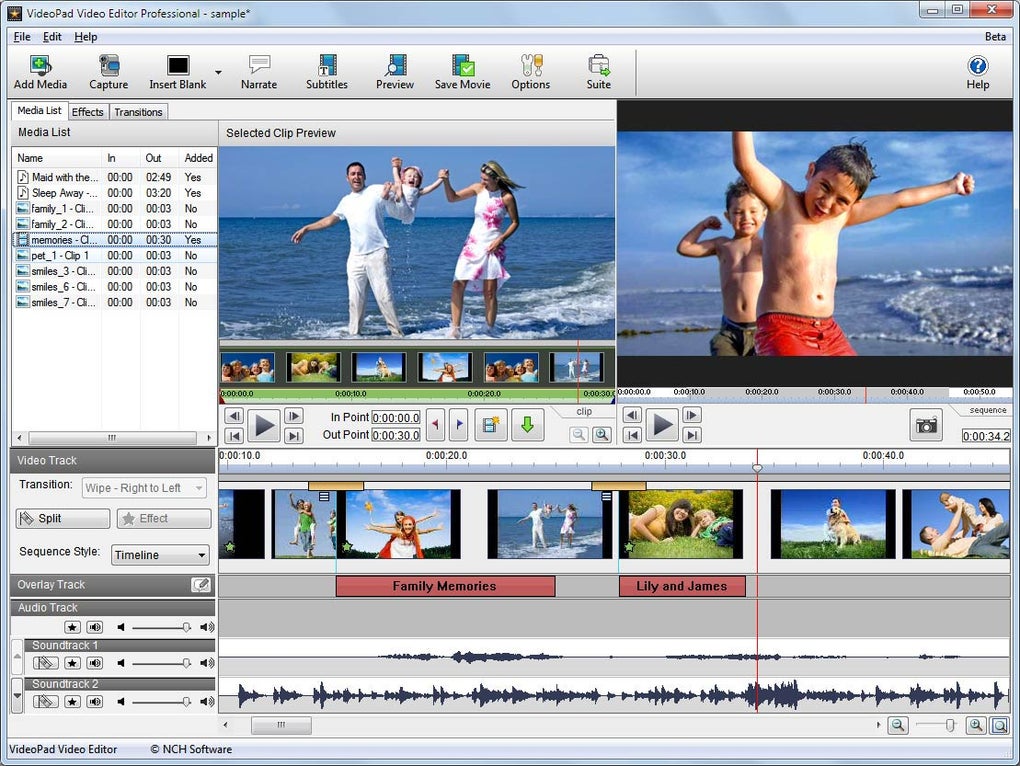
- Multi‑Track Timeline: Separate video, audio, and image tracks enable complex layering and precise synchronization.
- Advanced Color Correction: Adjustable brightness, contrast, saturation, and custom LUT support for professional‑grade grading.
- Audio Mixing & Editing: Built‑in waveform editor, background‑music library, and real‑time audio filters.
- Stabilization & Speed Controls: Reduce camera shake, create slow‑motion or time‑lapse sequences with a single slider.
- 3‑D Editing & Green Screen: Import 3‑D footage, convert 2‑D clips to 3‑D, and apply chroma key for compositing.
- Motion Tracking: Attach text, graphics, or effects to moving objects within a scene.
- Batch Processing: Apply the same filter or export setting to multiple files in one operation.
- Plug‑in Support: Extend functionality with third‑party effects, codecs, and animation packs.
- Online Publishing: Direct export to major social platforms and automatic generation of optimal bitrate settings.
Each feature is designed with usability in mind. For instance, the motion‑tracking wizard walks you through selecting a target, defining the tracking area, and applying an effect, all without requiring manual keyframe adjustments. The 3‑D tools include a simple stereoscopic preview so you can confirm depth perception before final rendering. Meanwhile, the batch‑processing module saves hours for content creators who need to apply the same branding overlay across dozens of videos.
Beyond the core toolset, VideoPad’s ecosystem includes a marketplace for additional assets and a community forum where users share custom templates, sound effects, and troubleshooting tips. This collaborative environment helps new users get up to speed quickly while giving power users a platform to showcase advanced workflows.
Installation, Usage & Compatibility
How to Install
Downloading VideoPad Video Editor is straightforward. Visit the official NCH website, click the “Download for Windows” or “Download for Mac” button, and save the installer (≈ 45 MB). Run the .exe (Windows) or .dmg (macOS) file and follow the on‑screen wizard: accept the license agreement, choose the installation folder, and opt‑in for automatic updates. The installer verifies the digital signature, ensuring a secure and untampered installation.
For mobile devices, the process mirrors that of any app store: locate “VideoPad Video Editor” in Google Play or the Apple App Store, tap “Install,” and grant the requested permissions (camera, microphone, storage). Mobile installations are sandboxed, providing an additional layer of security.
First‑Run Configuration
Upon first launch, VideoPad presents a welcome screen where you can select your preferred language, configure default export settings (resolution, codec, and target platform), and import a starter template pack. The “Home” tab offers quick access to recent projects, a media library, and a “Create New Project” button that opens a dialog for choosing timeline mode (Storybook or Timeline), frame rate, and aspect ratio.
Importing media is as simple as dragging files onto the media bin or using the “Add Files” button. VideoPad automatically detects the file format and, if necessary, prompts you to install missing codecs—a process handled silently in the background.
Operating System Support
VideoPad Video Editor runs natively on Windows 10/11 (64‑bit), macOS 10.15 Catalina and later, Android 8.0 and up, and iOS 13 and later. The desktop version leverages GPU acceleration on supported graphics cards (NVIDIA, AMD, Intel) to speed up rendering and real‑time preview. Mobile versions are optimized for ARM processors, ensuring smooth playback even on mid‑range smartphones.
Because the software adheres to modern OS standards, it integrates with system‑level features such as Windows File Explorer preview panes, macOS Quick Look, and Android’s share intent, allowing you to open and export projects directly from the file manager.
Pros, Cons, FAQ & Conclusion
Pros & Cons
- Pros:
- Intuitive, beginner‑friendly interface with clear separation of clips, effects, and audio.
- Comprehensive free version that covers most basic editing needs.
- Robust multi‑track timeline and 3‑D/green‑screen capabilities for advanced users.
- Cross‑platform availability (Windows, macOS, Android, iOS).
- Direct publishing to major social media platforms.
- Regular, secure updates and active community support.
- Cons:
- Premium subscription required for some high‑end effects (motion tracking, batch processing).
- Rendering speed can lag on older hardware lacking GPU acceleration.
- Limited advanced color‑grading tools compared to industry‑standard suites like DaVinci Resolve.
- Mobile version lacks full multi‑track editing capabilities.
Frequently Asked Questions
Is VideoPad truly free for personal use?
Yes. The free edition includes essential editing tools, unlimited export, and access to the template library. Advanced features such as motion tracking and batch processing are part of the paid subscription.
Can I edit 4K video with the free version?
The free version supports 4K import and preview, but real‑time playback may be choppy on low‑end PCs. For smoother 4K editing, the premium tier offers optimized GPU acceleration.
How does VideoPad handle audio mixing?
VideoPad includes a built‑in audio mixer with volume envelopes, fade‑in/out controls, and a library of royalty‑free sound effects. You can also record voice‑overs directly inside the app.
Is there a cloud backup option?
While VideoPad does not provide native cloud storage, projects can be saved to any folder synced with Dropbox, Google Drive, or OneDrive, allowing seamless backup and collaboration.
What export formats are supported?
Export options include MP4 (H.264/H.265), AVI, MOV, WMV, GIF, and audio‑only formats such as MP3 and WAV. The premium version adds support for ProRes and other professional codecs.
Conclusion & Call to Action
VideoPad Video Editor strikes an impressive balance between simplicity and power. Its free tier is more than sufficient for hobbyists and small businesses, while the subscription unlocks a suite of professional tools that rival heavyweight editors. The cross‑platform support, secure update mechanism, and built‑in social publishing make it a practical choice for anyone looking to create high‑quality videos without a massive learning curve. If you’re ready to turn raw footage into engaging content, download VideoPad Video Editor today and experience a seamless editing workflow that scales with your creative ambitions.







